
Welcome
Your Stifel Independent Advisor is now with Equitable Advisors, LLC.
Welcome, and thank you for being a valued client.
As part of Stifel Independent Advisors (SIA), joining Equitable Advisors, we are committed to making your transition as seamless as possible. Once your account has been successfully transitioned and you have registered on EquitableAdvisors.com, you will have convenient access to your account information, along with the opportunity to take full advantage of the resources, tools, and services available through Equitable Advisors.
Digital Experience
Your new digital experience
Equitable Advisors website and mobile app is a secure and user-friendly experience designed to provide you with seamless access to your portfolio and account-related documents. It offers 24/7 availability, ensuring that you can stay informed about the performance of your investments at any time.


Getting started is easy—register now and explore your account features.
FAQs
Getting started
Registering for online account access is simple.
Follow these steps
- In your browser, type in EquitableAdvisors.com.
- Click on “Log in" on the top right-hand corner.
- Select "Need to Register?”
- Select “Life or investments”.
- Input your email address, social security number, date of birth and click "Next".
- You will be prompted to send a code to your phone number on record for your protection. Enter the code and click "Submit".
- You will create a User ID and Password, then confirm your email and create three security questions.
- You are now registered and can access your account information.
Watch this video on the online registration process.
Note: If you get an error message, you may already be registered?

Registering for online account access is simple.
Follow these steps
- Register on the carrier website.
- Log into EquitableAdvisors.com
- On the Overview screen, scroll down to Find all your financial information in one place and click “LINK ACCOUNTS NOW".
- Click “I AGREE".
- Search for the carrier and select the specific carrier.
- Type in your User ID, Password, and change Policy/Contract to Account and click "CONNECT".
Watch this video on how to connect your outside accounts.

Yes, you will have access until November of 2027 to access your prior statements and tax documents.
The Equitable Mobile App lets you securely access your account anytime, view statements, monitor account activity, manage payments, and quickly find your financial professionals contact information.
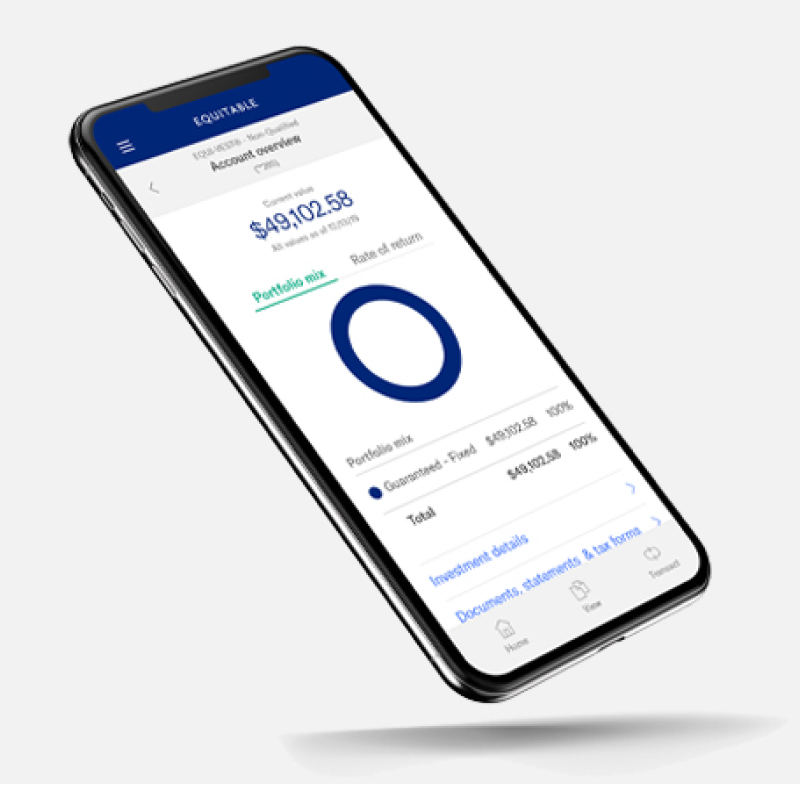
Download now


Login, security and sharing access
Forgot your password?
If you have forgotten your password, you may reset it online.
From the Sign in page, select "Forgot your User ID or Password" and follow the simple steps to restore access to all your accounts.
When creating your password, use 8 to 24 characters with at least 1 upper case letter, 1 lower case letter, 1 number and 1 special character.
There are some instances where you will not be permitted to reset your password. If your account has been suspended, you will need to call (877) 222-2144.
How do I update or change my password?
If you want to change to a new password.
Sign in to the Equitable Advisors website. On the Portfolio Summary page, select the "Personal Settings" link. Select the "Change Password" option and follow the instructions provided.
Yes, you can add a trusted contact during the new account opening process, contact your Financial Advisor for more information.
Yes, you can grant access to an authorized user.
Follow these steps:
- Log into EquitableAdvisors.com and go to the settings wheel on the top menu bar.
- Select "My Information".
- Click on "Edit".
- Select "Grant accesss" and follow the instructions.
authorized_access_800x450?qlt=85&ts=1789055174916&wid=600&fit=fit,1&dpr=off)
Account management
You can update your eDelivery preferences by logging into your online account.
Follow these steps:
- Log into EquitableAdvisors.com.
- On your laptop, select "Go Paperless" on the top menu bar. On your mobile device, select the three lines on the top left, and go to "Settings".
- Then, select your mail or paperless for one or more of the following:
- Statements
- Additional Documents such as trade confirmations, prospectus & shareholder communications, and notices.
- Tax Forms
- Scroll back up and click "Save".

You can monitor account balances & activity by signing in to Equitable Advisors.
Follow these steps
- In your browser, type in EquitableAdvisors.com.
- Click on “Log in" on the top right-hand corner.
- On your laptop, select Accounts from the navigation bar and select balances, positions or activity.
- On your mobile device, select the three lines on the top left and select Accounts", then select balances, positions or activity.

You can securely move funds and manage connected accounts—all in one place.
Follow these steps
- Contact your financial advisor to set up instruction.
- Log in to EquitableAdvisors.com.
- On your laptop, select Transfer Money from the navigation bar. On your mobile device, select the three lines on the top left and select "Transfer Money".
- Select "Make a transfer" or "Transfer Activity".

Financial planning & insights
You can access several calculators and tools to help you with your goals.
Follow these steps
- Log in to EquitableAdvisors.com.
- On the top menu bar, select "Calculators”.
- There are several calculators to choose from.

Contact us
Where to go for customer support
From a wealth management and financial planning perspective, your financial advisor is best positioned to help with questions about your account, transactions, or next steps. Connect with your financial advisor for personalized guidance.
Self-service options
Call the Equitable Advisors help desk for self service help
Equitable Advisors help desk
Select option 6
GE-9062673.1 (08/2026) (Exp. 08/2028)

1345 Avenue of the Americas
New York, NY 10105
© 2026 Equitable Holdings, Inc. All rights reserved
IMPORTANT: This informational and educational website does not offer or constitute investment advice or the direct or indirect recommendation of any particular investment, financial product, or the appropriateness of any particular option, product, or service. Your unique needs, goals, and circumstances require the individualized attention of your own financial professional. “Advisor” is used as a general term throughout this website to describe insurance/annuity and investment sales and advisory professionals who may hold varied licensing as insurance agents, registered representatives of broker-dealers, and investment advisory representatives (IAR) of registered investment advisers, respectively. “Advisor” does not exclusively refer to investment advisor representatives or financial advisory/planning services. Duly-registered and duly-licensed representatives offer securities through Equitable Advisors, LLC (NY, NY (212) 314-4600), member FINRA, SIPC (Equitable Financial Advisors in MI & TN), offer investment advisory products and services through Equitable Advisors, LLC, an SEC-registered investment adviser, and offer annuity and insurance products through Equitable Network, LLC (Equitable Network Insurance Agency of California, LLC; Equitable Network Insurance Agency of Utah, LLC; Equitable Network of Puerto Rico, Inc.). Representatives may transact business, which includes offering products and services and/or responding to inquiries, only in state(s) in which they are properly registered and/or licensed. Equitable Advisors, LLC its affiliates and associates do not provide tax or legal advice. Individuals may transact business, which includes offering products and services and/or responding to inquiries, only in state(s) in which they are properly registered and/or licensed. For more information about Equitable Advisors, LLC you may visit equitableadvisors.com/crs to review the firm's Relationship Summary for Retail Investors and General Conflicts of Interest Disclosure. Equitable Advisors, LLC (Equitable Financial Advisors in MI & TN) is an equal opportunity employer. M/F/D/V.